


Written by
Kosta Nicolaou
Director, Skefto
Fact-checked
Most risk register templates I looked at were built for one project, or were a blank grid with a “description” column. That’s fine until someone asks why a risk is rated High, who owns it, or whether anything has changed since last quarter. So I built a register that answers those questions. It’s free, it’s in Excel, and you don’t need to give us your email.
Key takeaways
- Free Excel download, no email needed. It has a 50-row register, a 5×5 risk matrix and six filled-in examples.
- Pick likelihood and consequence from dropdowns and the score and rating fill in themselves, for both current and residual risk.
- It goes further than a blank grid. Event, cause and consequence each get their own column, there’s a “within appetite?” column, and overdue reviews turn red.
- Built for whole-of-organisation risk (cyber, compliance, financial, people), not only safety or projects.
Download the template
The file has four tabs:
- How to use. Seven short steps.
- Risk register. 50 numbered rows, ready to fill in, with dropdowns and filters.
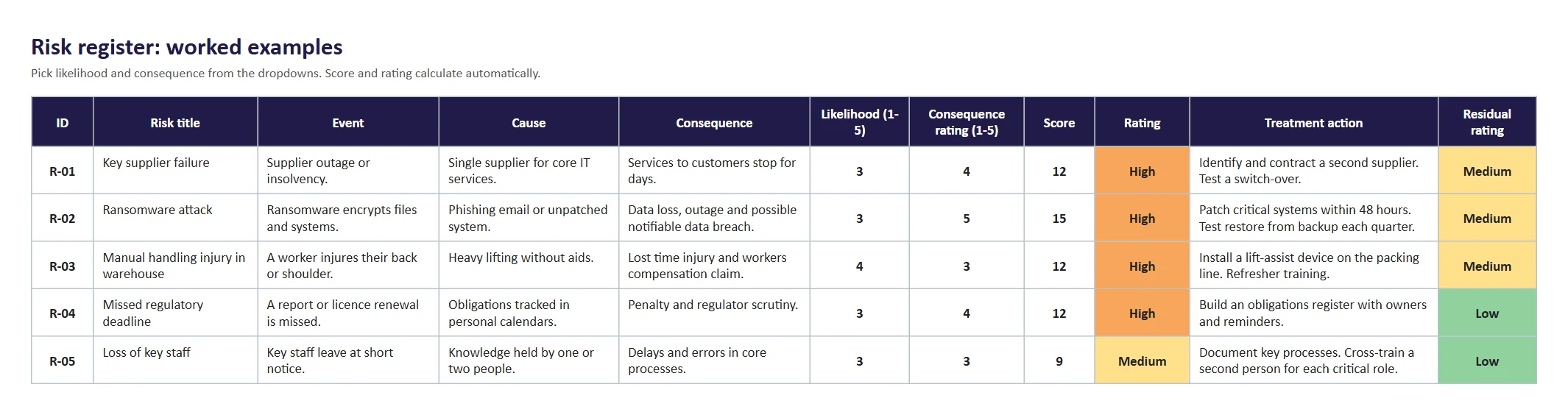
- Examples. Six worked risks across cyber, WHS, compliance, people, financial and operational.
- Risk matrix. The 5×5 matrix, with plain-English scales and what each rating means.
It also works in Google Sheets. Upload the file to Google Drive and open it with Sheets.
What each column is for
I kept the columns a risk owner, an auditor or a board member will actually ask about.
| Column | Why it’s there |
|---|---|
| Event | What could happen. One specific thing, such as “ransomware encrypts files and systems”. |
| Cause | Why it could happen. The source or trigger, such as “phishing email or unpatched system”. |
| Consequence | The impact on your objectives if it does happen, such as “data loss, an outage and a possible notifiable data breach”. |
| Risk owner | One person or role who is accountable. A team can’t own a risk. |
| Existing controls and effectiveness | What you already do, and an honest view of how well it works. |
| Likelihood and consequence rating (1 to 5) | Dropdowns, so everyone scores on the same scale. The consequence rating scores the impact you wrote in the Consequence column. |
| Score and rating | Calculated: likelihood x consequence, then Low, Medium, High or Extreme. |
| Within appetite? | Says whether the organisation is willing to accept the risk as it stands. “No” turns red. |
| Treatment action, owner and due date | What will be done, by whom, by when. |
| Residual likelihood, consequence and rating | Where you expect the risk to sit once the treatment is done. |
| Status and next review | Open, in treatment, accepted or closed. Past review dates turn red. |
Event, cause and consequence: why they’re separate columns
A lot of registers have one “description” box, and that’s where risks go vague. Splitting it into three columns makes you answer three different questions:
- Event: what could happen? Write the thing itself, not the topic. “Cyber risk” is a topic. “Ransomware encrypts files and systems” is an event.
- Cause: why could it happen? This is where your controls should point. If the cause is “phishing email or unpatched system”, MFA, training and patching make sense. If you can’t name a cause, you can’t choose a control.
- Consequence: what would it mean for your objectives? Service stops, people get hurt, money is lost, a regulator gets involved. This is what you score with the consequence rating.
One event can have several causes, and one cause can lead to more than one event. If a row starts to need two events, split it into two risks. Separate columns also make the register easier to filter. You can sort by cause and see, for example, how many risks come back to one supplier.
If you’re new to risk registers, we’ve explained the basics in what is a risk register.
How the 5×5 risk matrix works
The score is likelihood multiplied by consequence, so it runs from 1 to 25. The template uses these bands:
- 1 to 4: Low. Manage through routine procedures.
- 5 to 9: Medium. Manage with existing controls, with an owner who monitors it.
- 10 to 16: High. Needs senior management attention and a treatment plan with a due date.
- 20 to 25: Extreme. Act now and escalate to the executive or board.
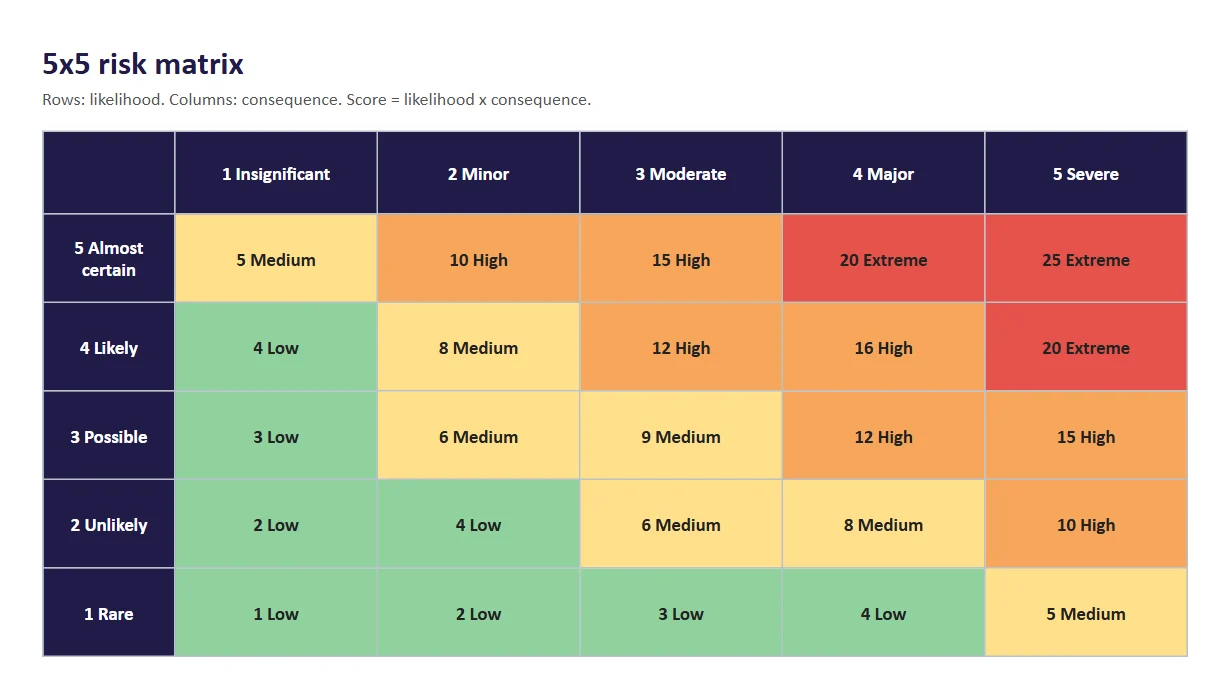
These bands are a starting point, not a rule. AS ISO 31000:2018, the risk management standard most Australian organisations follow, doesn’t prescribe a matrix. Set the scales and bands to match your own risk appetite, and write down why. The consequence scale on the “Risk matrix” tab mixes safety, cost, service and reputation, so one scale works across the whole organisation.
How to fill it in: one risk, start to finish
Here’s example R-02 from the template, so you can see the thinking rather than just the cells.
- Fill in the three description columns. Event: ransomware encrypts files and systems. Cause: a phishing email or an unpatched system. Consequence: data loss, an outage and a possible notifiable data breach.
- Give it an owner. The CIO.
- List the controls you have. MFA on email, weekly offline backups and phishing training. They’re only partly effective, because restores have never been tested.
- Score it. Possible (3) x Severe (5) = 15, which is High.
- Check it against appetite. No, the organisation won’t accept a risk like this at High.
- Treat it. Patch critical systems within 48 hours and test a restore every quarter. Owner: IT Security Lead. Due: end of February.
- Rate the residual risk. Unlikely (2) x Major (4) = 8, which is Medium.
- Set a review date. If it passes without a review, the date turns red.
How often should you review a risk register?
There’s no single rule, but a common rhythm is:
- High and Extreme risks: monthly, or at every executive meeting.
- Medium risks: quarterly.
- Low risks: at least once a year.
- Any risk: straight away after an incident, a near miss, or a big change like a new system, supplier or law.
Commonwealth entities have to follow the Commonwealth Risk Management Policy. The Department of Finance publishes guidance on putting it into practice, which is useful reading even outside government.
When a spreadsheet stops working
A spreadsheet is a good way to start. It starts to hurt when:
- several people edit copies of the file and nobody is sure which one is current
- treatment actions are written down but nobody chases them
- the board report means copying the register into slides every quarter
- incidents and audit findings never make it back into the risk ratings
That’s what Skefto’s risk management software is for. The same columns become one shared register. Owners get reminders when reviews and actions are due, incidents and actions link straight to the risks they affect, and dashboards show the current position without any copying.
Frequently asked questions
What should a risk register include?
At minimum: each risk’s event, cause and consequence, an owner, existing controls, a likelihood and consequence rating, the overall rating, treatment actions with owners and due dates, and a review date. This template adds residual risk and a “within appetite?” column.
Is there a free risk register template in Excel?
Yes. The Excel template on this page is free with no email form. It includes dropdowns, automatic ratings, a 5×5 matrix and six worked examples.
What is a 5×5 risk matrix?
It’s a grid that rates risks on two scales from 1 to 5: how likely the risk is, and how bad the consequence would be. Multiplying them gives a score from 1 to 25, which maps to a rating such as Low, Medium, High or Extreme.
What’s the difference between inherent and residual risk?
Strictly, inherent risk is the level before any controls. Many organisations find that hard to rate, so they rate current risk instead: the level with the controls they have now. Residual risk is the level you expect once the planned treatment is done. This template records current and residual risk, so you can show the treatment is worth it.
Can I use this risk register for projects?
Yes. Use the “Project” category and set the review dates to match your project milestones. For a single project, you may only need the register and matrix tabs.
Who should own the risk register?
Usually the risk or governance team looks after the register itself, while each risk has its own owner who is accountable for it. The executive and the board, often through an audit and risk committee, review it regularly.
Outgrown the spreadsheet?
Skefto runs the same register with owners, reminders, linked actions and live dashboards for your executive and board.
Sources
- Department of Finance, implementing the Commonwealth Risk Management Policy (RMG 211): finance.gov.au/government/managing-commonwealth-resources/managing-risk-internal-accountability/risk-internal-controls/implementing-commonwealth-risk-management-policy-rmg-211
- Standards Australia, AS ISO 31000: official website
Checked 17 November 2026.